Search

Powered by Squarespace

follow_us_bbd


Send me your track
Thursday
28Jan2010

Beat Box: Does Apple's iPad Have Any Value For Music Producers/Performers?


Unless you haven’t left your house today (and do not own a TV or an Internet connection), you’ve probably heard about Apple’s unveiling of the iPad this afternoon. I’d have to say that for one of the company’s most widely speculated and, frankly, over-hyped product introductions in their entire 30-year history, it’s been interesting hearing the mixed reactions to the portable device over the course of the day.

Without getting too far into the specs and features of the iPad (which I’m sure have been drilled into your head by now), I feel that the summation of everyone’s reaction to it is that it merely seems like a large, overpriced version of the iPhone which still lacks Flash support, has no camera, but is optimized for reading electronic versions of newspapers and magazines. At $500, it’s price point will probably be a bit too expensive, especially for those who already use a netbook or iPhone.

What I find interesting is that if you turn back the clock on Apple’s history, there have almost always been mixed initial responses to product launches like this. When the first iPod was released in 2001, it’s $400 price tag scared a lot of potential users away. Many felt their money was much better justified buying a portable CD player or cheaper MP3 player with less storage space. Fast forward to 2007. The first iPhone was released for $500, and it came with restrictions on which service provider you could use. It took a long time for the iPhone and iPod to gain momentum. However, once the popularity rose as consumers ultimately found them to be useful within their daily lives, the price of both dropped and better versions were released.

It’s been interesting seeing the iPhone and iPod evolve, especially in the sense that both can do many more things then just what they were originally intended to do. Consumers had no clue that they would eventually be able to watch movies on an iPod in 2001, or download apps that could help them plan their next vacation on an iPhone in 2007. Practical features and additions to their initial feature sets have made both desirable for many years now.

I can see much of the same happening with the iPad, especially in the sense that it can carve itself several different niches in industries such as publishing and gaming. This actually lies in stark contrast to the iPhone/iPod, both of whom were walking blindfolded into over-saturated markets of PDA’s and MP3 players (respectively). There can possibly be some unchartered territory the iPad is jumping into; and as we all know, Apple has the knack for releasing products with features that “most consumers don’t even realize they want yet.”

Although I do not intend to purchase one myself, one niche that I especially see the iPad being useful in is for music production and performance.

Frankly, I think a 10” device has a great deal of potential in acting as a MIDI control surface. Jazzmutant’s Lemur has been a well received product which has such a feature set: a fully customizable midi interface, where you can build your own faders, knobs, trackpads, etc and assign them to any parameter within your DAW software. The problem is, few will be able to harness it’s usefulness because the $2000 price tag is outside most people’s price range. With Apple’s invitation for developers to hit the ground running with formulating iPad apps, if someone was to make a similar device to the Lemur run on this device, wouldn’t you think that would make it’s $500 seem like a good deal in comparison?

Software manufacturers such as Akai and Novation have recently jumped on the iPhone App bandwagon; and I find it interesting how both said companies released very popular physical control surfaces for Ableton Live last year. I can definitely see the potential in these guys making a control surface based app to control a program like Live via it’s interface. With an iPhone being a little too small to be practical, and a laptop possibly being too large and cumbersome, an iPad could be just the right size to trigger clips and ride faders, in an interface even more user-friendly than the Launchpad. 

Remote editing of DAW’s through programs such as Hexer’s TouchOSC and the Cubase iPhone app is also feasible, although I think the iPhone holds an advantage in it’s size for now. 

When thinking of the possibility of being able to launch apps that have different MIDI surfaces, all at your fingertips, instead of having to physically lug out three or four separate pieces of kit which do pretty much the same exact thing, this thing really starts to sound enticing.

Without a USB cable connection, I would probably have to write off the iPad’s potential of working with a DJ-based application such as Serato or Traktor for now. Because you’re dealing with more text when searching for songs, a small screen may be at a bit of a disadvantage. I’ve noticed that many who utilize Serato or Traktor prefer working off of 15” laptops and for good reason: it’s tough to see the tracklistings on a smaller screen! The iPhone DJ app can have some potential down the road if you want to keep things entirely within the box, however one significant thing I noticed about the iPad’s feature set is that it allegedly only outputs a mono signal. This would render monitoring under headphones useless as it would only work in one ear; however I might be wrong on this assumption so feel free to correct me!

Basically what I’m getting at here is that although the practical use of the iPad may not seem obvious at first, who knows what the future can hold for it. I’m not going to act like I can predict the future or anything, but the iPad does seem like quite an open-ended piece of hardware, and it should be interesting to see what developers will come up with and how the consumer market responds. After all, I said in the earlier part of the last decade that I would NEVER buy an iPod, and in the latter half that I have no use for an iPhone, and I don’t know how I lived without either for as long as I did! (PS- I also mentioned somewhere in this article that I wouldn’t plan on buying an iPad, either. I’ll be sure to remember this 3 or 4 years from now)

What are your thoughts on the iPad- do you think it has the potential to be of value to musicians and producers, or within your own profession for that matter? Or do you think it will be about as relevant as the Newton and G4 Cube by this time next year?

Monday
21Dec2009

Beat Box: KJ Sawka's "Mad Beats" - Free Drum Samples For Ableton

KJ Sawka is a rising star in the drum and bass scene. He is renowned for being one of the only performers who actually is a live drummer that actually matches the genre’s blinding fast 175 beats-per-minute tempo. Over the past few weeks he has been working on a kit of samples which he has recorded through his kit and cleaned up in Ableton Live. They are available as a free download on Ableton’s site and also include a host of other goodies, including groove templates, basslines, and keyboard riffs.

Check the video on the link above (I’d embed it here but it isn’t available on YouTube)- Sawka demonstrates how he constructed each of the kits and how he tweaks all of the parameters with the kit loaded through his APC 40. Looks like they adapt nicely not only for producing, but also for your own live performances. 

You do need the Live 8.1 upgrade in order to use these by the way. 

Sunday
20Dec2009

Beat Box: Allen & Heath Xone:32- New Lower Price Merges Bang With Buck

For the past several months I was in the process of searching for a well-built, quality DJ mixer that was not going to break the bank. As a bedroom DJ on a tight budget, I knew straightaway that my options were going to be limited and really wanted to stick with either a Pioneer or Allen & Heath. For the past two years I was using a two-channel Korg Kaoss Mixer (KM-202); although it was a decent model I wasn’t nuts about it’s digital output (which would heavily distort anything even remotely approaching the red, which made it really tough to mix certain styles of music such as drum & bass under headphones). I also wanted to buy one with more than just two channels. The Kaoss Pad on the KM-202 was great, but honestly didn’t really use it much when I owned it. Meat and potatoes take precedence over bells and whistles for me!

Even though my budget went as high as $700, I was very pleasantly surprised to see that djdeals.com had Allen & Heath’s Xone:32 3-channel mixer marked down to a clearance price of $300 on their site. Not only did this sled originally sell for around $600-700, but the smaller 2-channel Xone:22 only retails for about $50 less, and the Xone:42 (the next step up) massively leapfrogs the 32 in price, retailing at $900! Without even THINKING about it, I just bought it. Knowing full well that it boasts Allen & Heath’s well renowned analog circuitry, as well as their customary build quality and engineering, it couldn’t have been a more appropriate time to ditch the plastic handles and knobs of the KM-202 (sorry Korg!)

First off, I should mention that shopping on djdeals.com was a great experience overall, and highly recommend checking out the site. Not only was I granted free shipping, but I placed the order on a Friday and it arrived at my door the following Wednesday. Amazing turnaround time.

Without rambling on too much about the Xone:32, I’m going to break down the vast amount of pros, as well as a few of the cons about this mixer. This should cover everything this beast is capable of, and hope you find it informative if you’re looking to purchase one yourself.

Xone:32 - The Good Stuff.

1. Build Quality. From the minute I took this out of the box, it was love at first sight. There is no question that this is a very nicely built machine. The stainless steel casing coupled with the shiny silver coating of paint on the face is flawless in every way. It’s a fairly large mixer, but yields a great deal of space for a working DJ to fiddle with all of the knobs and faders; nothing feels cluttered at all. I especially like the long channel faders with the “studio mixer” style switches as well as the piercing lights which work wonders in a dark environment.

2. Sound Quality. Probably the MOST important feature to consider in a DJ mixer is nothing but aces here. Although I only have limited experience on working the far more expensive Xone:42 and Xone:62, I think it’s safe to say that the sound quality is pretty much the same on this piece of hardware. Because this is an analog mixer, even if there is a bit of distortion in the music you are playing or if you accidentally bring in a louder track and push it into the red zone, it is forgiving in the amount of available headroom you have to work with as you (hopefully) try to fix things in the mix. The 3-band EQ knobs on each channel don’t lie to you: in the 12 o’clock positions they do not affect the sound in any way, yet has a fairly smooth and responsive gain structure as you adjust the levels. The channel faders also work nicely as well; some may not like the fact that the majority of the gain in volume is noticeable throughout the top third of the fader, but it’s the same response curve you are dealing with when using a professional studio mixing board.

3. Plenty of Line Out Options. The back of the mixer has a host of options; many of them are standard but there are a few bonuses as well. There is a set of RCA record outs, allowing you to hook the mixer directly to a computer or other recording device to record your mixes. Separate booth and mix outputs, along with inputs for either turntables (with pre-amps) or other line-in devices are obviously standard. The chassis to hook up the ground wires from your turntables is probably one of the best I’ve used- it was much more cumbersome hooking them up on my Korg and old Numark Matrix mixers! A nice bonus is a set of auxiliary outputs to either connect an additional set of monitors or a sampling/effects device (which you have to route back into the mixer using the line in’s of one of your channels, this is controlled by using the auxiliary send/return knob above the EQ knobs). 

4. Filter LFO. You only get one “effect” on the Xone:32, but I must say, it’s a pretty damn good one. It comes with an LFO that controls the cutoff frequency of whichever channel you have the filter applied to; using the “tap tempo” button you can easily set it up to be fully synchronized with the beat of the song. One button on the right side controls whether or not the LFO is on, another button toggles it between regular and double speed, and the resonance knob controls how drastically the filter affects the sound. Using a combination of the hi/band/lo pass buttons, along with the VCF slider which governs which frequencies the filter gets applied to, it’s a nice bonus. The filter recall memory bank is unnecessary as they can’t recall the LFO speed or VCF, and probably won’t use them very much, if at all.


Xone:32 - The Cons.

1. Crossfader. Although I’m mainly a mix DJ these days and don’t have as much of a problem with this, I will say right now to serious turntablists- stay AWAY from this mixer. Although the fader has some nice features such as reverse and a knob that controls the fader curves between channels, it is NOT geared towards scratching at all. The fader does not glide as transparently as a Rane or Vestax, making it tougher to perform even basic transforms or crabs with. Another thing to be aware of is that each side of the fader is not assignable to any channel you want- only channel 1 and 3 work with the fader. You can reverse the two channels, but channel 2 does not work with the crossfader at all. If you are not a turntablist, the fader is fine for basic mixing applications, and it seems like most mix-oriented DJ’s rarely use the faders anyhow.

2. The Gain Knobs. Probably the biggest issue I had at first with the Xone:32 is the fact that the gain knobs are NOT located directly above the EQ knobs on each channel. Instead, they are on the back of the mixer, albeit at the top so it’s still easy to make adjustments. This takes a bit of getting used to as you sometimes have to look around the back to see what position each knob is set in. The auxiliary knobs used for effects devices, which many DJ’s will probably rarely use, should have swapped places with the channel gains. Hopefully Allen & Heath will fix this on an upcoming version as I don’t doubt for a second they received an arsenal of complaints about this decision!

3. Channel metering. You are going to have to rely on your ears for analyzing the levels of each individual channel as the metering system is only four lights, as opposed to the much more detailed strips on the more expensive models. Ah well, you can’t always have your cake and eat it too on a less expensive mixer.

4. You can only cue one channel at a time. Hardly a big deal, but if you’re doing Jeff Mills, Richie Hawtin, or Andy C style blends using 3+ tracks playing simultaneously throughout the entire mix, be aware that you can only have one channel cued up in the headphones at a time.

Regardless of the cons, I can’t recommend the Xone:32 enough. I got used to the gain knobs on the back in literally less than a day, and although I wish the fader was more optimized for scratching, I’ll gladly take it’s undeniable sound quality over it any day of the week. For it’s price, I give this mixer a 9 out of 10!

If you want to see a great video of this baby in action, check out the youtube video demo below. I found this guy to be pretty helpful in explaining it’s features, and he’s pretty funny too.

PS- I’d like to eventually do a Korg KM-202 full review as well; even though it didn’t suit my needs it isn’t at all a bad mixer; although (I think) it’s out of production you can get the 2-channel version that I owned for around $150-200 in the second hand market and have had a few people explicitly ask me how I rated it. 

Saturday
19Dec2009

Beat Box: Complete Rework of Prodigy's Smack My Bitch Up in Ableton

Amazing video, this is pretty much a complete reverse engineering of Smack My Bitch Up! Jim Pavloff sources every single sample used in the song here (how the hell he was able to figure out how the guitar riff from Rage’s Bulls on Parade was used, which probably isn’t even common knowledge, is beyond me). Then he takes it a step further and arranges everything, and even figured out all of the send effects used to generate a startlingly accurate re-interpretation of the 1996 classic. Nice work.

Monday
07Dec2009

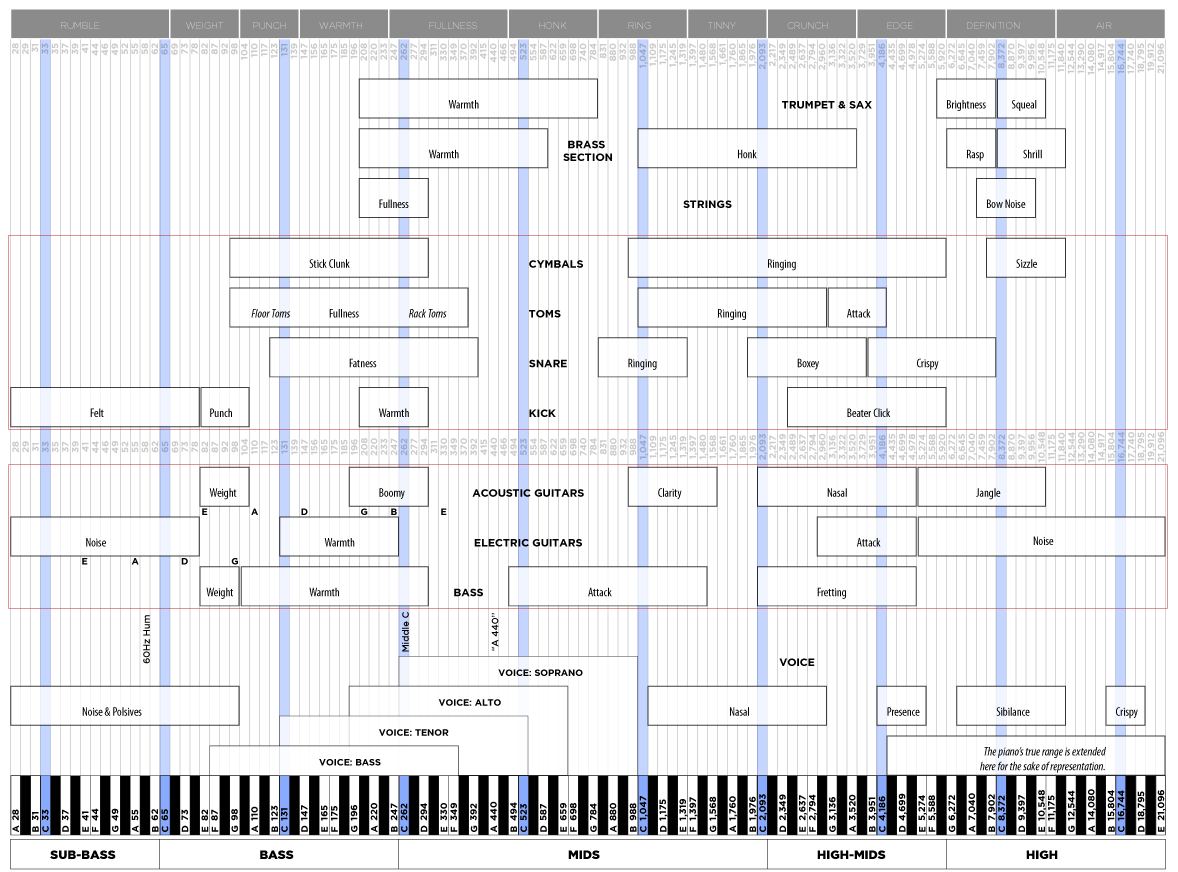
Beat Box: Hi-Res EQ Chart For Instruments, Chords, and More

Here is something that can come in very handy for producers of all backgrounds. Many thanks to AbletonVids on Twitter for sharing!

In a nutshell, this is a frequency chart that illustrates the ranges that many different types of sounds occupy within the entire audible range, from 20 Hz all the way up to 20 Khz. This definitely comes in handy when arranging music and trying to figure out which instrument tracks to use and which ones not to use to prevent different pieces occupying the same dynamic range from fighting against one another. Another extremely helpful piece is at the bottom, where the frequency of each chord is listed as well. This comes in handy for tasks such as tuning drum and percussion sounds. Download the hi-res version below, print out, frame, and hang this bad boy in your studio today!

Hertz-Chart (hi-res .png)

Wednesday
02Dec2009

Beat Box: Weak Kicks in Your Sample Folder? Synthesize Your Own!

If you think the kicks in your samples folder on your hard drive are a little lacking, and no amounts of EQ or compression will bring them to life, check out this video. This tutorial is by Love Capacitor, and he demonstrates how to generate a kick from scratch in Ableton using two oscillators from the Operator synth (which comes with the full suite or is a $159 add-on). 

Adjust the envelopes so there is a short decay/sustain, and increase the pitch envelope a bit to give an up-front “thump”. Make sure you use the algorithm where each operator generates it’s own sound (as opposed to the default, where one operator modulates the next, which modulates the next, etc.)

One thing to keep in mind here is that he also tunes his kicks using the course/fine knobs on each operator, make sure you click “fixed” in order to be able to do this. He copies the parameters from operator/oscillator A to B. C and D are turned off. He uses specific frequencies to ensure the kicks match the key of the rest of the song; there are charts you can find online that show you which frequencies relate to each scale to help you tune your drum sounds!

To finish, he also applies some gentle compression and uses an auto filter to roll off the high end a bit.

Monday
30Nov2009

Ion's Discover DJ: Monetary Factors For Getting Into DJ-ing No Longer Exist!

Four or five years ago, when CD’s and MP3’s were just starting to wrangle the vast majority of DJ’s away from their precious vinyl, many would have shuttered at the idea of a fully functional DJ interface and music management system for less than a hundred dollars. Since then, I have not only been amazed at the emergence of technology such as Ion’s Discover DJ which has made this possible, but am equally impressed with the changes in attitudes from many DJ’s who have come to embrace them.

Now I’m not saying for a second that something like the Discover DJ system, released last month with a low price tag of $99, will necessarily be well suited to a standard club setting. With only a 2-band EQ on the mixer, very basic effects, and sound quality output that has yet to be proven, most professional DJ’s aren’t going to turn a cheek at this.

However for someone who is looking to getting into DJ-ing now is a better time than ever before to get into hobby or even wedding DJ-ing without breaking the bank. The software package will allow DJ’s to manage their digital assets, along with a sleek tactile interface (I mean, who doesn’t like spinning the wheels of plastic?) For $99 there ARE some nice features on this, such as a looper, pitch bend, the software GUI looks solid, and the ability to record your mixes.

I think it’s great that this technology has made it easier than ever before to become a DJ based on the price of entry point. Yes, it makes the competition far more intense due to the quantity of jocks, however this should encourage creativity and force those that want to be serious about it to invest time in looking for good music. Those who change their mind? Well, at least they didn’t spend a fortune like they would’ve 10 or even 5 years ago.

Like it or not, there is no longer an “industry standard” interface when it comes to DJ-ing. Obviously this has made things a little more difficult for promoters and sound technicians as many DJ’s will demand something a bit different than the next man/woman. However as all these different interfaces are starting to peacefully co-exist with one another, it has allowed people to focus on what is most important: the MUSIC.

What’s your take on this? Do you think it makes more sense for an entry level DJ to start out with a less expensive system like the Discover and use the leftover cash for MP3’s, or should they invest straightaway on a higher end system like a Pioneer CDJ-1000 or Technics 1200 setup, as these are what you will still see most often set up in clubs?

Tuesday
24Nov2009

Beat Box: Max For Ableton Live is Released!

max4live.info Tutorial: Beginning Max from max4live on Vimeo.


Announced on Ableton’s website yesterday, the highly anticipated Max For Live is now available for download! If you are unfamiliar with what this is, it’s essentially a visual-oriented programming environment developed by Cycling ‘74 that allows you to extend the capabilities of what you can do in Ableton Live by creating your own instruments and effects racks from scratch. You can also connect these devices in a completely free and modular environment, and there are even a bunch readily available right out of the box. 

Although I have no intentions of utilizing Max For Live myself, if you have a highly technical background and you are looking to create instruments from scratch or finding new solutions and ways to interface with your MIDI controllers that haven’t been developed yet, this could be a worthy expansion to your Live suite. Max For Live’s integration with Ableton is promised to be seamless.

For an intro on how the Max programming environment functions, take a look at the video above. 

Max For Live is a separate add-on you must purchase separately; it costs $299, or $99 if you already own the original Max package. You also need to download the Ableton Live version 8.1 update, which was also released yesterday.

http://www.ableton.com/maxforlive

Sunday
22Nov2009

Beat Box: Tom Cosm Ableton Tutorial & Additional Tut's For Small Donation

Many Ableton users know Tom Cosm and his mastery of the program and willingness to drop little nuggets of information from time to time. The video above shows ten little tricks/keyboard shortcuts he utilizes to speed up his daily workflow. If you spend a lot of time in the piano roll/MIDI-editor (I know I sure as hell do!) you will especially find this helpful.

In addition to this, a GOLDMINE of Live tutorials by Jason Timothy have been posted on his site, www.musicsoftwaretraining.com, for streaming. Jason was one of the first Live users to give detailed tutorials of the program online, and the content here originally came from a DVD he originally had available for sale. The reason he is doing this is because he is trying to get viewers to make a donation to help a friend of his obtain a ticket for a friend of his to fly to Alaska to be with a loved one who’s partner unexpectedly passed away recently.

All of the donation info is at the top of the link provided above - and after watching about half of the videos and donating myself, I can honestly admit these are well worth the money. There are pretty much NO free tutorials out there that go in depth on Sampler and Operator, however this video covers all of this as well as a section on DJ-ing, and plenty of focus on each of the built-in effects and basic training.  

Wednesday
18Nov2009

Beat Box: Soul School Refill Pack For Propellerhead Reason

Propellerhead has just released a brand new refill pack called Soul School, which is chock full of soulful drums, guitars, bass, keys, and grooves from the 1960s and 1970s. They have gone to the source for this project, teaming directly with many of the producers who were working with artists such as the Temptations in the 1970s! Many of them have gone back into the vaults to extract sounds and grooves from original reel-to-reel tapes, in a cleaned up format, for use in Reason. Plenty of patches as well to work as a cornerstone to help you synthesize your own sound. Check out the video!

http://www.propellerheads.se/products/refills/soulschool/index.cfm